Documentation version: v0.1.0 · Source revision
Silver

Silver is a terminal workbench for hardware projects. It runs project builds and simulation suites, launches configured ASIC flows, and lets you inspect waveforms, synthesis results, timing paths, and other run evidence without leaving the terminal.
Install · Try the ASIC example · Local documentation · Online documentation
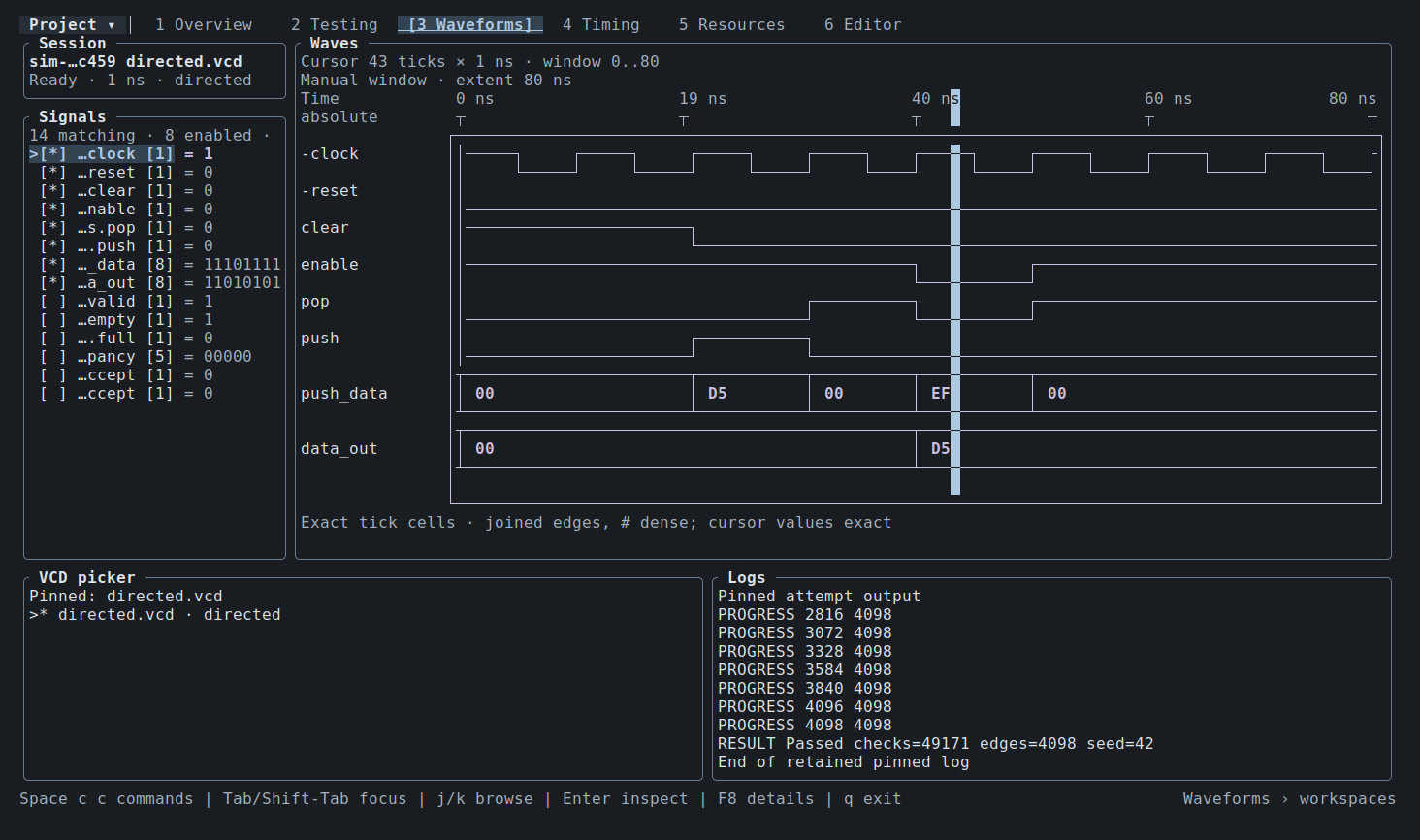
Inspecting a passing Controlled FIFO simulation from hardcaml_asic_example.
Install and open Silver
Pick one install route. Paste its command blocks in order in the same terminal, and stop if a block reports an error.
Prerequisites
- Silver: The prebuilt release targets Ubuntu 26.04 LTS on x86-64. A source installation automatically prepares a private OxCaml switch and Silver's dependencies, including Cobalt. See the installation guide.
- Projects: The machine running the Silver service needs the project's build environment: Dune for Hardcaml, or Bazel and the Classic Bluespec toolchain for the Bluespec starter. Simulation needs the project's configured simulation provider and any tools it invokes.
- ASIC flows: The service host also needs a compatible hardcaml_asic provider. The design may need the provider's OCaml libraries to build. Install the selected flow's PDK and EDA tools separately using the provider's provisioning instructions. They are not bundled with Silver.
Install the Ubuntu binary
This route requires a published GitHub Release. If there isn't one yet, build from source instead.
- Install the Ubuntu runtime libraries and download tools:
sudo apt update && sudo apt install -y curl jq libgmp10 zlib1g
- Download and verify the latest binary archive, then enter the extracted directory:
repo=https://github.com/bopurtell/silver
tag=$(curl -fsSL https://api.github.com/repos/bopurtell/silver/releases/latest | jq -er '.tag_name') &&
  workdir=$(mktemp -d) && cd "$workdir" &&
  archive="silver-${tag}-linux-x86_64-ubuntu-26.04.tar.gz" &&
  curl -fsSLO "$repo/releases/download/$tag/$archive" &&
  curl -fsSLO "$repo/releases/download/$tag/SHA256SUMS" &&
  sha256sum --ignore-missing --check SHA256SUMS &&
  tar -xzf "$archive" && cd "${archive%.tar.gz}"
- Install Silver for your user:
./install.sh --without-asic
This skips the install-time ASIC provider check; you can still configure ASIC projects later.
Build from source
The installer builds Silver in its own OxCaml environment, without modifying your project's opam switch. The first build takes longer and uses additional disk space; later installations reuse that environment.
- On Ubuntu, install the host build tools:
sudo apt update &&
  sudo apt install -y autoconf bubblewrap build-essential bzip2 ca-certificates curl git gzip \
    libgmp-dev libsqlite3-dev opam pkg-config python3 rsync unzip xz-utils zlib1g-dev
- Clone and enter the repository. To build a published version instead, use the source tarball download commands in place of this step.
git clone https://github.com/bopurtell/silver.git && cd silver
- Prepare the private switch, build and install Silver:
./install.sh --without-asic
Developers who already have the dependencies in a compatible switch can build using that existing switch.
Open a project
Starting from an empty directory? Launch Silver with ag and choose New Project…
to select a starter and destination. For headless creation of a Classic
Bluespec design with Rust verification, run
ag init --bluespec.
- Add the default install directory to
PATHand check the installed command. Keep theexportline in your shell configuration if you want it in new terminals.
export PATH="$HOME/.local/bin:$PATH"
command -v ag
If that resolves to The Silver Searcher instead of this workbench, use the
installed absolute path ($HOME/.local/bin/ag) or adjust PATH.
- In your project's normal build environment, open a terminal in the project directory:
ag
- Press Space c c to open the command palette. To quit from the workbench, press q, then Enter to confirm the default Yes. For jobs that should survive quitting, use a persistent daemon.
Try the ASIC example
The hardcaml_asic_example
repository contains a FIFO design with a standard flow and a balanced profile.
This walkthrough runs synthesis on that design; it does not require any saved runs.
- In the example's project OxCaml environment, install
hardcaml_asicif you don't already have a compatible provider:
git clone --branch oxcaml https://github.com/bopurtell/hardcaml_asic.git &&
  (cd hardcaml_asic && ./install.sh)
- Clone and enter the example:
git clone --branch oxcaml https://github.com/bopurtell/hardcaml_asic_example.git && cd hardcaml_asic_example
- Provision the tools and configure the project for synthesis. The provider's bootstrap guide covers host requirements for the flow, including Docker and Nix.
hardcaml-asic-flow provision --toolchain "$PWD/_flow_tools" &&
  python3 -B scripts/configure-synthesis.py
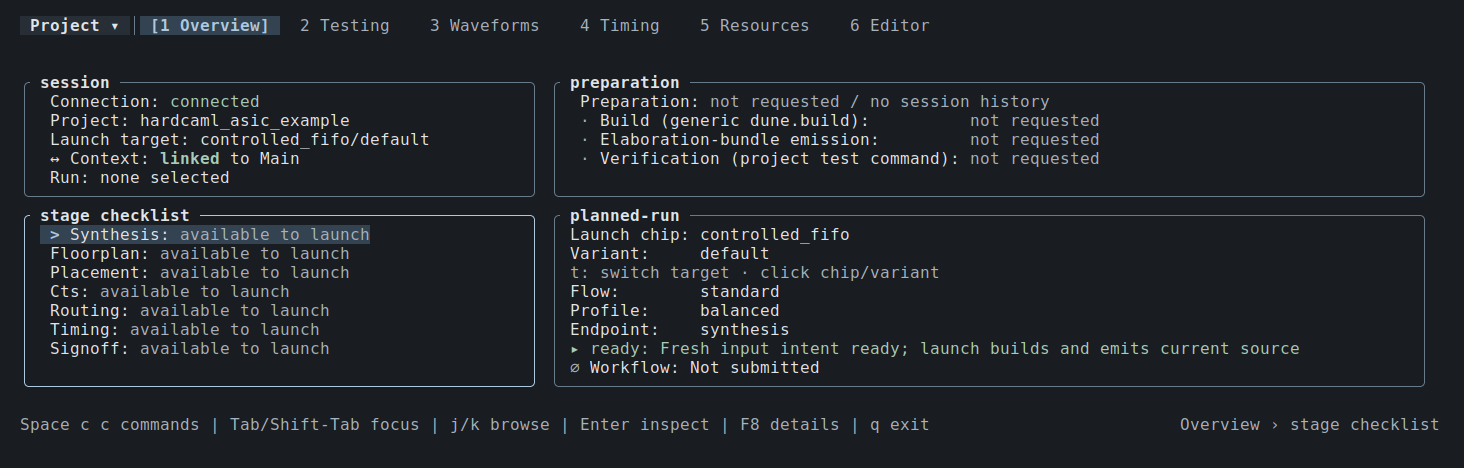
To configure the example's simulation suites as well, see the full example setup. 4. Launch Silver from the example directory, then open Overview.
ag
- In Planned Run, check Launch chip. The example's default is
controlled_fifo / default; select it if another chip is active. - In the Stage Checklist, highlight Synthesis and press Shift+R to stage and launch it. To review the plan before starting, press r instead and follow the stage checklist guide.
Documentation
- Project workflows: opening, creating, editing, sharing, and attaching to a daemon.
- Testing workspace and the Cyclesim counter: simulation without ASIC tools.
- ASIC evidence, synthesis inspection, and timing investigation.
- Workspace layouts and terminal controls.
- Silver's own test suites.
Legacy hardcaml-workbench command aliases and configuration files remain readable.
The OCaml packages are now silver, silver_provider and silver_web;
provider source should use Silver_provider and be rebuilt against the new SDK.